Introducing PrintedEdges V3: A Rebuilt Edge Creator and a Stronger Future
PrintedEdges V3 is our biggest platform update yet with a completely rebuilt Edge Creator, improved project management, more powerful marketing tools, stronger file protection, and a new foundation for everything still to come.
Over the past year, PrintedEdges has grown faster than we ever expected. During the V2 era alone, our community generated more than 2,500 books through the platform.
That growth taught us a great deal.
We listened to your feedback, watched how authors, designers, publishers, and formatters used PrintedEdges in real projects, and identified the places where the experience could be clearer, more dependable, and more flexible.
The result is PrintedEdges V3.
This release is much more than a visual update. We rebuilt the Edge Creator interface, project and account experience, processing infrastructure, storage workflows, and security foundation to create a platform that is easier to use today and better prepared for everything we want to build next.
Here’s what’s new.
A Completely Rebuilt Edge Creator
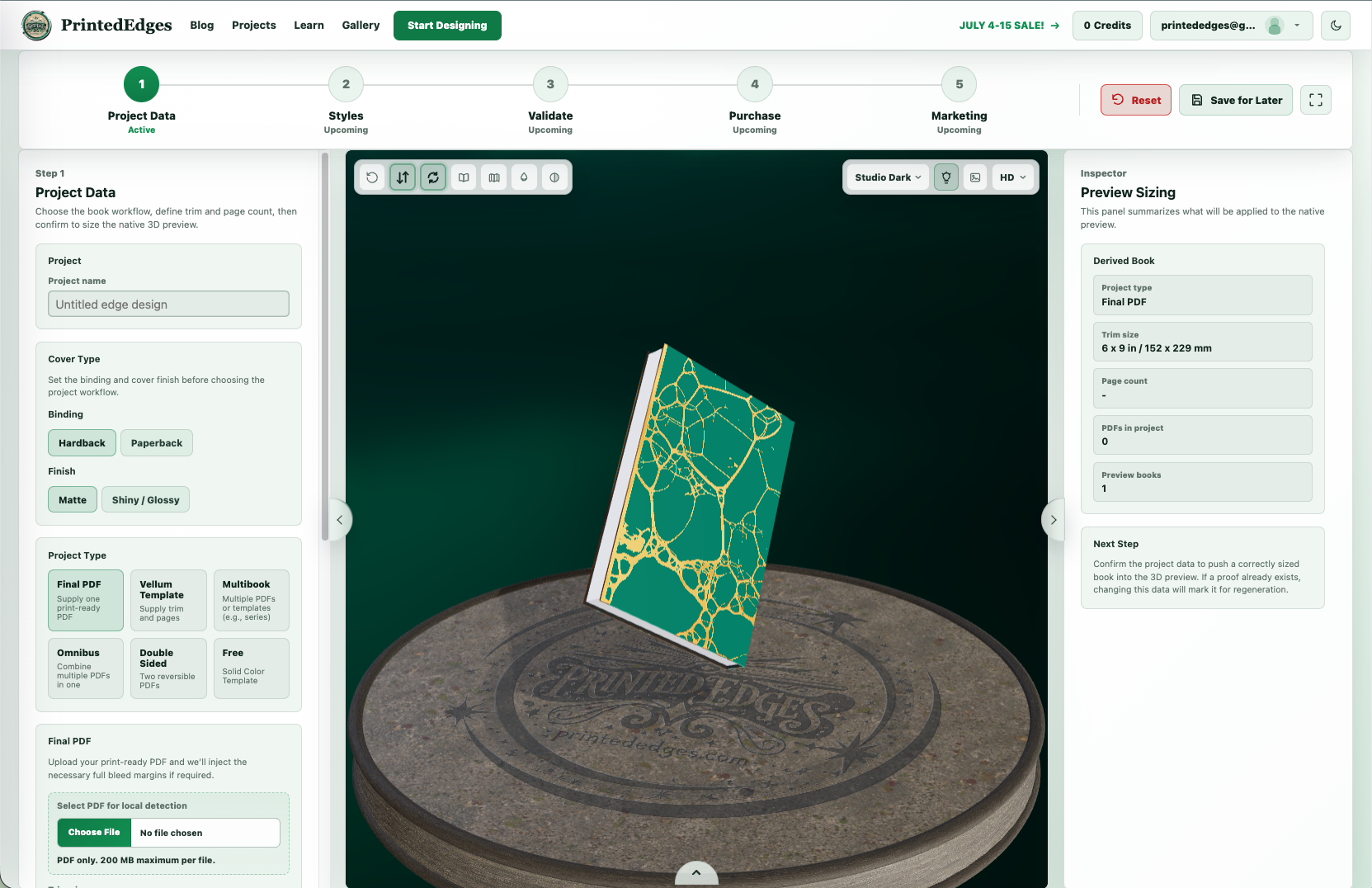
The Edge Creator has been redesigned around a clearer five-step workflow:
- Project Data
- Styles
- Validate
- Purchase
- Marketing
Each step has a specific purpose, making it easier to understand where you are in the process and what you need to do next.
New users can move from uploading a project to reviewing a proof with clearer guidance, while experienced users still have access to the advanced settings and creative controls they need.
The updated workspace brings your project controls, interactive 3D preview, detailed settings, proof status, purchase options, and marketing tools into one connected experience. You can explore your design, inspect it from multiple angles, make adjustments, generate a proof, and approve your project before purchasing the final processed file.
Whether you are creating a single title, a multibook series, a Vellum template, or a more advanced project, V3 is designed to make the process feel more organized from beginning to end.
What’s New in V3
Dark Mode and Light Mode
You can now switch between dark and light viewing modes throughout the new experience.
Choose the mode that feels best while designing, reviewing, or managing your projects. Your display preference only changes how the platform appears on your screen—it does not change your proof, final processed file, or marketing exports.
A Completely Revamped Project Dashboard
Your project area has been rebuilt into a more useful home for your PrintedEdges account.
From the new dashboard, you can access saved and purchased projects, review project history, manage downloads, view credits and referrals, and see recent account activity in one place.
The goal is simple: make it easier to return to your work and understand what is available without searching through multiple pages or starting over.
Improved Save for Later and Project Reloading
V3 includes stronger Save for Later and project-loading workflows.
When you are signed in, you can save an in-progress design to your account and return to it from your Projects dashboard. The updated system does a better job of reconnecting your project with its stored artwork, settings, proof files, and other assets when you reopen it.
This is especially helpful for detailed projects that take more than one session to finish.
Better Protection for Purchased Projects
Purchased projects are now protected from accidental edits that could change the project associated with your final files.
You can continue reviewing your completed project and accessing its available downloads while the original purchased record remains protected. When changes are needed, V3 provides clearer options for creating an editable copy or regenerating an eligible project.
Regeneration for Eligible Paid Projects
Eligible paid projects can be updated and regenerated during the 90-day regeneration window.
This gives you more flexibility to correct or update a project without rebuilding everything from the beginning. Regeneration eligibility and timing are shown as part of the project experience so you can better understand the options available for a purchased project.
Stronger Multibook Workflows
Multibook projects are complex by nature, so V3 was rebuilt to manage them more deliberately.
Full-series artwork, individual book settings, per-book previews, and generated proof outputs are kept organized as separate parts of the project. This makes it easier to work across a series while still reviewing the books individually.
The updated 3D preview also makes it easier to inspect individual titles or visualize the collection together.
More Dependable Proof and Download Access
V3 includes significant improvements to the way proofs and purchased files are stored and accessed.
Projects retain stronger connections to their saved files, and the platform can refresh supported download access behind the scenes when an older link is no longer available. This helps make returning to long-lived projects more dependable.
As always, we recommend carefully reviewing your generated proof before purchase. After purchasing, use the Final PDF (Processed PDF) when preparing your project for your printer or formatting workflow.
Expanded Marketing Tools
PrintedEdges is not only designed to help prepare your files for print—it can also help you show off your book before launch day.
The new Marketing workspace includes expanded tools for creating polished images, beauty shots, GIFs, and videos directly from the 3D preview.
You can adjust camera positions, backgrounds, lighting, book presentation, and other visual settings to create assets for:
- Social media announcements
- Cover reveals
- Preorder campaigns
- Advertisements
- Online storefronts
- Newsletters
- Launch-day graphics
- Series and special-edition promotions
These tools are available while you design, giving you more ways to visualize and promote your project before purchasing the final processed file.
Stronger Account and Project Security
Many of the most important V3 improvements happen behind the scenes.
We strengthened account authorization, project ownership checks, storage protection, and download access so customer files continue to remain protected and safe.
These safeguards may not always be visible, but they are an essential part of making PrintedEdges more dependable as the platform and our community continue to grow.
A Stronger Foundation for What Comes Next
V3 required us to rebuild major parts of PrintedEdges from the ground up.
The new architecture gives us a stronger foundation for project processing, long-running jobs, file storage, customer accounts, downloads, and future features. It also gives us better tools for monitoring the platform, identifying problems, and supporting customers when something does not work as expected.
Most importantly, this foundation allows us to improve PrintedEdges more consistently.
Instead of forcing every new feature into an older system, we now have a platform designed to grow alongside the needs of authors, designers, publishers, and professional formatters.
V3 is a major release, but it is also the beginning of the next stage of PrintedEdges.
Updated Tutorials Are Coming
Because the Edge Creator and project experience have changed so significantly, we are also updating our tutorials and educational resources.
Over the coming weeks, you will begin seeing:
- A refreshed V3 Edge Creator overview
- Updated onboarding instructions and screenshots
- New walkthroughs for project setup, styles, validation, and proof review
- Clearer purchase and download guidance
- Tutorials for Save for Later and returning to existing projects
- Expanded multibook guidance
- New marketing image and video tutorials
- Updated printing-preparation resources
Our goal is to make these resources useful for both first-time users and experienced customers who want to explore the more advanced parts of V3.
You can find the latest available guidance in the PrintedEdges Learning Hub.
More Frequent Updates Going Forward
This post marks the substantial launch of PrintedEdges V3, but it will not be the last update you hear from us for another several months.
Going forward, we plan to publish shorter and more frequent posts covering:
- New feature releases
- Tutorial updates
- Workflow improvements
- Marketing tools
- Printing and file-preparation guidance
- Community requests
- Behind-the-scenes progress
We want to do a better job of showing you what has changed, explaining how to use it, and sharing what we are working on next.
Thank You for Helping Us Build V3
PrintedEdges is built around the real projects and challenges that authors, designers, and publishers bring to us every day.
Thank you for continuing to send feedback, report problems, request new features, and share the books you create. Many of the improvements in V3 exist because someone in our community took the time to tell us what they needed.
We are incredibly excited about what this new foundation makes possible, and we cannot wait to show you what comes next.
Start designing with PrintedEdges V3 or visit the Learning Hub to explore our latest resources.
For early previews, feature announcements, and examples from the community, follow PrintedEdges on Instagram and Threads.
Have a recommendation or need help with a project? Email us at printededges@gmail.com.
— Zach & Angela Co-Founders, PrintedEdges